Add
Description
This command adds features to an existing project: a test project (--tests), the documentation pages (--docs), a workspace package as a requirement (--package), or the workspace layout itself (--workspace).
Example to add both tests and docs to the project:
pasc add --tests --docs
This command must be run from the current directory of a FreePascal/Lazarus project to work. Here's how each option works:
--tests
Use the project from the previous page quickstart as a base to try out the features of this page.
To add a test project to the project, do the following: with the project folder open on vscode, open a terminal session and from the project root execute the following command:
pasc add --tests
This command will add a test project by creating a subfolder named tests and adding a basic test project template with some example cases. We can see that our project structure has been modified a bit to something like this:
./HelloWorld
├───.vscode
│   ├───launch.json
│   └───tasks.json
├───src
├───tests
│   ├───TestHelloWorld.lpi
│   ├───TestHelloWorld.lpr
│   └───TestCaseHelloWorld.pas
├───.gitignore
├───boss-lock.json
├───boss.json
├───helloWorld.lpi
└───helloWorld.lpr
Open TestCaseHelloWorld.pas file, there are three tests in this unit, one test that passes, one that fails and one that causes a memory leak.
These tests are like this to demonstrate how the pasc test report looks like. The idea behind a different report is to provide a quick identification of tests that failed for some reason. And this is done through the use of colors and alignment and with the consolidation of test information and possible memory leaks in a single report.
Now our tests task can be run with a test project available, you can now run a vscode task "pasc: run tests", it depends on "lazbuild: build tests". You should see an output similar to this:
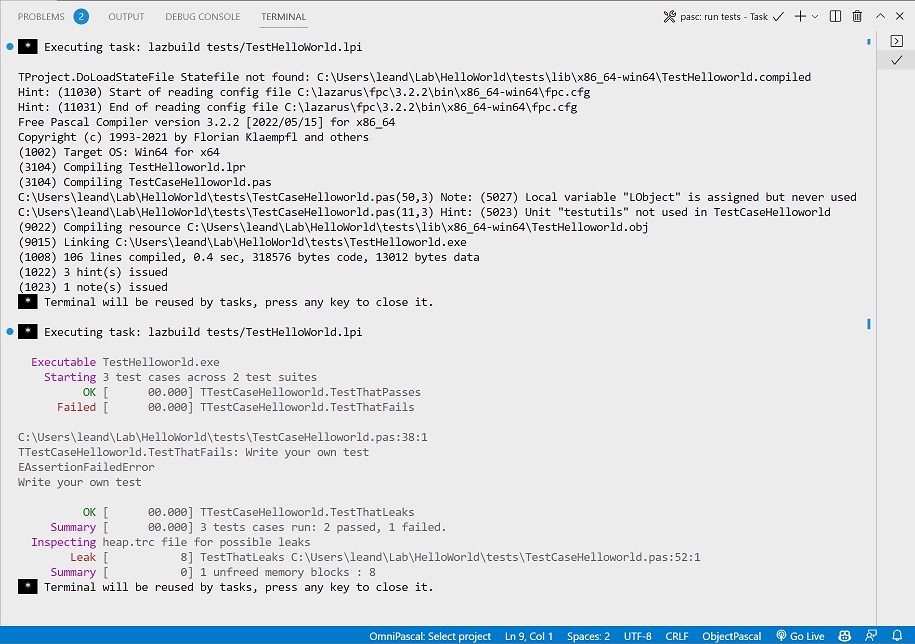
In this image we have a first block that is the output of the pascal compiler and in the second block we have the output generated by pasc with the summary of the execution of all tests. We can see that there is a test failing: TTestCaseHelloWorld.TestThatFails, you can ctrl + click on the file name to check the respective line for that test. Another problem case is a leak included on purpose in TTestCaseHelloWorld.TestThatLeaks, you can also ctrl + click on the file to locate the line of code with the problem.
Try to fix the problems by commenting out the line of code from the test that fails and uncommenting the LObject.Free line from the test that leaks. Run the tests again and you will see something like the output below:
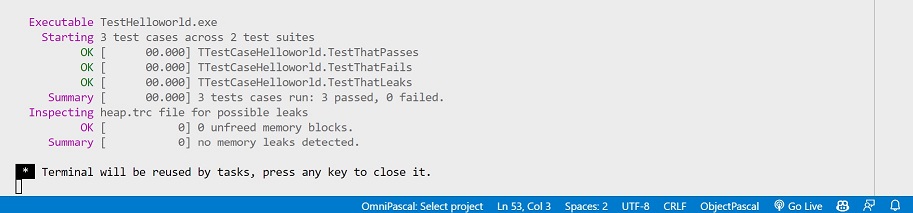
We can see that all tests are passing now. Therefore, consolidating the test results with a summary of possible leaks gives us productivity to address problems as soon as they become visible. There are more features that can be combined with the pasc test command such as the watch command.
--docs
Using the same project run the following command to add features that aim to facilitate the creation of project documentation:
pasc add --docs
This command will add a "docs" subfolder with the pages used to generate the project documentation:
./HelloWorld
├───docs
│   └───generate
│       ├───introduction.txt
│       └───quickstart.txt
├───src
├───tests
└───helloWorld.lpi
introduction.txt has the project overview and quickstart.txt a quick way to start using it, both written with the pasdoc tags. Every new .txt in that folder becomes a page. To generate the documentation into the docs folder, run the docs command, or the "pasdoc: build documentation" task:
pasc docs
The menu is organized by pasc: the guides first, the command*.txt pages under Commands, then the code reference. The site can be published with GitHub Pages.
--package
Inside a workspace member, makes its project (and its test project) require a package of the workspace by a relative path:
pasc add --package=core
--workspace
Converts the project in the current folder to a workspace. An app with a .lpi and .lpr at the root moves to apps/<name> with git mv, with its relative paths, the boss modules paths, .gitignore and boss "mainsrc" updated, and its old build output removed. A repository with several projects or a .lpg project group is adopted in place, without moving files. A boss library, used by other repositories, is not converted. It needs a git repository without uncommitted changes (or --force), and --dry-run shows the plan without changing anything:
pasc add --workspace --dry-run
pasc add --workspace
Next Build Command |
|---|
Generated by PasDoc 1.0.4.